> For the complete documentation index, see [llms.txt](https://docs.sidepit.com/llms.txt). Markdown versions of documentation pages are available by appending `.md` to page URLs; this page is available as [Markdown](https://docs.sidepit.com/use-sidepit/beta/onboarding/lock-bitcoin.md).
# Fund and Lock Bitcoin
Decide your amount, fund your own Sidepit ID, then LOCK by sweeping it to Sidepit's deposit address.
Putting Bitcoin on Sidepit is two separate actions, in a fixed order:
1. **Fund** — decide how much you want to trade, and send exactly that amount to your **own** Sidepit ID, the connected `bc1q` address you just created.
2. **Lock** — sweep the entire balance of your Sidepit ID to **Sidepit's deposit address**, using UniSat.
The amount decision happens before anything moves — at the funding step, not the LOCK step: LOCK sweeps whatever the Sidepit ID holds.
The order matters because Sidepit identifies your account from the LOCK transaction itself: it credits the account whose Sidepit ID the payment spends from.
{% hint style="danger" %}
Only ever send Bitcoin to Sidepit's deposit address **from your Sidepit ID account**. If funding from an external address or exchange, first send the funds to your Sidepit ID account. A payment sent to the deposit address from anywhere else cannot be matched to your account.
{% endhint %}
## Before you fund
1. Read the live contract with the [Public API quickstart](/users-and-agents/api.md#keyless-live-check).
2. Treat the published initial margin as an engine minimum per contract, not a recommended deposit.
3. Allow for adverse P\&L, working-order margin, execution fees, and the Bitcoin network fee.
4. Start small. Use a dedicated `bc1q` Sidepit ID holding only the amount you intend to lock.
Sidepit charges an execution fee of **125 sats per contract per side per execution**. At $100,000/BTC that is about **$0.125 per side**. Opening and later closing one contract costs that trader 250 sats before P\&L.
## Step 1: decide the amount, fund your own Sidepit ID
1. Decide how much you want to trade with. That decision is made here — LOCK will sweep everything the Sidepit ID holds.
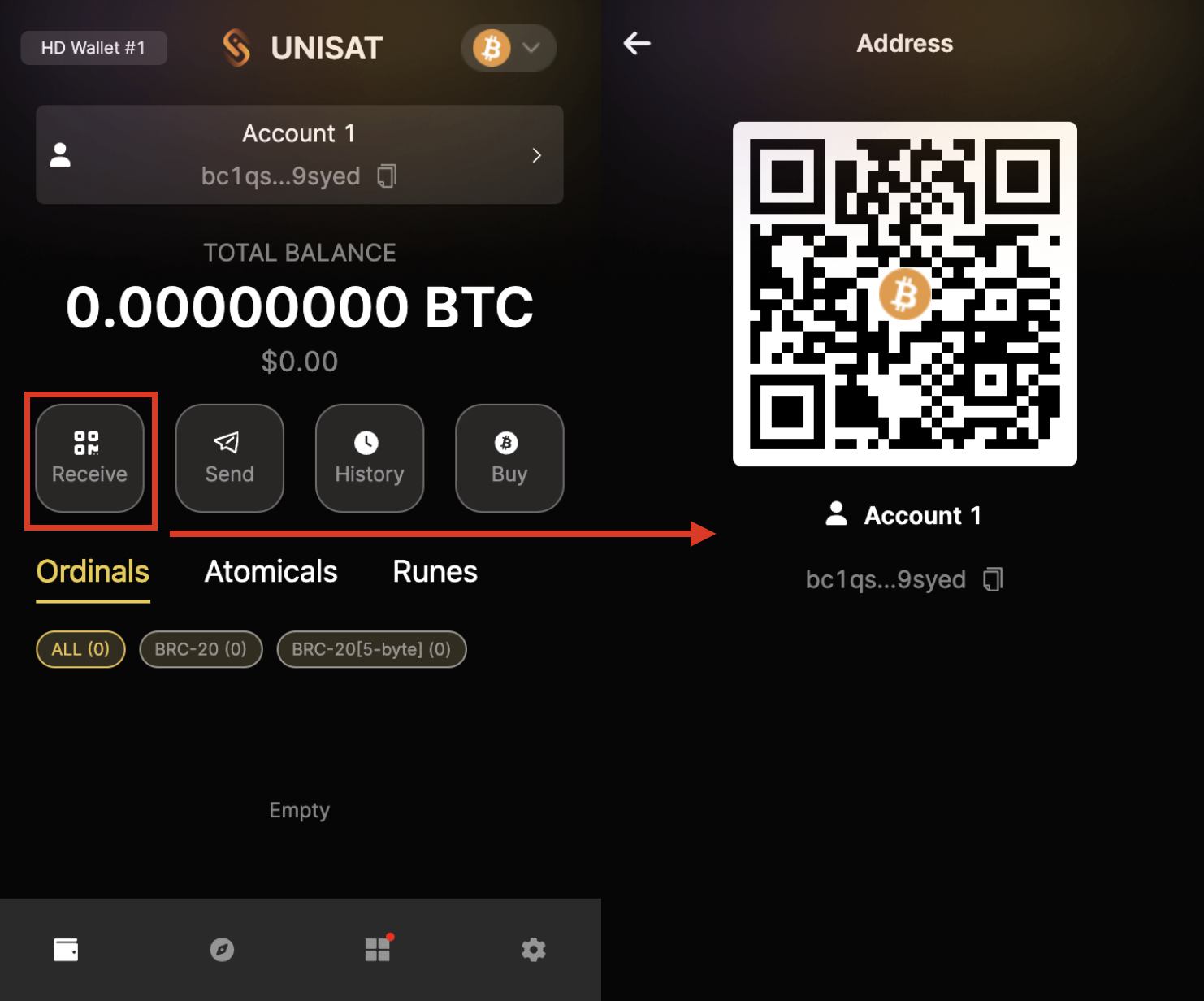
2. In the connected UniSat wallet, choose **Receive**. Copy and verify the complete Native SegWit `bc1q` Sidepit ID.
3. Send exactly the chosen amount from your external source to that address.
4. Wait until UniSat shows the funds as confirmed.
Fund your own Sidepit ID before using LOCK.
## Step 2: LOCK — sweep your Sidepit ID to the deposit address
This is where you handle Sidepit's deposit address. Verify it first — see the next section — then:
1. In UniSat, with your connected Sidepit ID selected, choose **Send**.
2. Paste Sidepit's deposit address and verify every character of it.
3. Send the **entire balance** — use Max. The Bitcoin network fee comes out of it.
4. Review, sign, and send.
5. Record the complete public transaction ID.
Screenshot slot: UniSat Send from the connected Sidepit ID to the verified deposit address.
Do not retry an ambiguous send. If anything about the transaction is unclear, inspect the address and transaction ID first.
Advanced users can also LOCK from the terminal client in the open-source [Public API repository](https://github.com/sidepit/Public-API).
## Verify the deposit address
You are about to paste this address into a real Bitcoin transaction, so confirm it against independent public sources first. The deposit address is:
**Sidepit deposit address:**\
[`bc1qn9szw2tfte4m2l7enhentvjpvnque932xr2m03`](https://ordinals.com/address/bc1qn9szw2tfte4m2l7enhentvjpvnque932xr2m03)
Two independent public sources confirm it:
1. **On-chain, via Ordinals.** The deposit wallet holds **Jacket #8** of the Sidepit Jacket collection (the children of the [Sidepit parent inscription](https://ordinals.com/children/f3c5985ee48ceac9af3ff7aaa63626a2a4b1bb9f59a02c5822ca6878afc2ee2ci0), inscribed March 2024). Open [Jacket #8 on ordinals.com](https://ordinals.com/inscription/42713f393a35faaddf5d173cfef61673437c483de9a31f5847f0b3e8bd9df0a5i0) and read the address currently holding it.
2. **In the open-source client.** The same address is pinned as `SIDEPIT_WALLET` in [`users-cli/cli/constants.py`](https://github.com/sidepit/Public-API/blob/main/users-cli/cli/constants.py) in the public repository.
If this page, the Jacket #8 holder, and the repository constant ever disagree, stop and contact the Sidepit beta operator before sending anything.
{% hint style="warning" %}
Send to this address only from your Sidepit ID — never from an exchange or any other wallet. If Sidepit ever changes the deposit address, Jacket #8 moves with it, so the on-chain pointer stays correct.
{% endhint %}
## Verify account credit
A seen deposit may appear as pending before it is credited. Sidepit does not promise a fixed confirmation count or completion time.
Open the trading app at [app.sidepit.com](https://app.sidepit.com) with your connected wallet and check your account. A pending deposit has been seen but is not yet available margin — wait and check again; do not send again. Once credited, the funds appear in your available margin, subject to margin rules.
If support is needed, provide only the complete public Sidepit ID and Bitcoin transaction ID.
---
# Agent Instructions
This documentation is published with GitBook. GitBook is the documentation platform designed so that both humans and AI agents can read, navigate, and reason over technical content effectively. Learn more at gitbook.com.
## Querying This Documentation
If you need additional information that is not directly available in this page, you can query the documentation dynamically by asking a question.
Perform an HTTP GET request on the current page URL with the `ask` query parameter, and the optional `goal` query parameter:
```
GET https://docs.sidepit.com/use-sidepit/beta/onboarding/lock-bitcoin.md?ask=&goal=
```
`ask` is the immediate question: it should be specific, self-contained, and written in natural language.
`goal` is optional and describes the broader end goal you are ultimately trying to accomplish on behalf of the user. GitBook uses it to tailor the answer towards what is most useful for that goal.
The response will contain a direct answer to the question and relevant excerpts and sources from the documentation.
Use this mechanism when the answer is not explicitly present in the current page, you need clarification or additional context, or you want to retrieve related documentation sections.