> For the complete documentation index, see [llms.txt](https://docs.sidepit.com/llms.txt). Markdown versions of documentation pages are available by appending `.md` to page URLs; this page is available as [Markdown](https://docs.sidepit.com/use-sidepit/beta/onboarding/create-wallet.md).

# Create a Sidepit ID

Connect a Native SegWit UniSat address as your Sidepit ID.

A Sidepit ID is a Bitcoin address you control. The current web flow requires a UniSat **Native SegWit** mainnet address beginning `bc1q`.

## 1. Request access

Open [app.sidepit.com](https://app.sidepit.com) in a desktop Chrome-compatible browser. ProofNet access remains beta-code gated. Use the access flow provided by Sidepit; do not accept a code or wallet link from an unverified message.

## 2. Install UniSat

Install the official [UniSat Wallet Chrome extension](https://unisat.io/download). Confirm the publisher and URL before installing.

<figure><img src="https://954013533-files.gitbook.io/~/files/v0/b/gitbook-x-prod.appspot.com/o/spaces%2F0IyfR8sDr4geAO23BULo%2Fuploads%2Fgit-blob-0625bd9f905c795d68b36a56cda5af513e0ddc2e%2Fimage%20(1)%20(1).png?alt=media" alt="UniSat download page" width="375"><figcaption><p>Install UniSat only from its official distribution page.</p></figcaption></figure>

## 3. Select Native SegWit

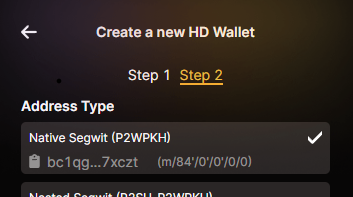
Create or import a wallet in UniSat, then select a Native SegWit address type. The address must begin `bc1q`.

<div align="center"><figure><img src="https://954013533-files.gitbook.io/~/files/v0/b/gitbook-x-prod.appspot.com/o/spaces%2F0IyfR8sDr4geAO23BULo%2Fuploads%2Fgit-blob-ff3613a58d65d8f10b7380c43f5325cd916fe68e%2FNativeSegwitUni.png?alt=media" alt="Selecting a Native SegWit bc1q address in UniSat"><figcaption><p>The connected bc1q address becomes the Sidepit ID.</p></figcaption></figure></div>

If UniSat creates seed words, back them up privately. Do not photograph, paste, upload, or show them to an AI agent. Sidepit support does not need them.

## 4. Connect the wallet

Choose **Connect Wallet** in the Sidepit app and approve the connection in UniSat. Confirm that the connected full `bc1q` address is the address you intend to use.

<figure><img src="https://954013533-files.gitbook.io/~/files/v0/b/gitbook-x-prod.appspot.com/o/spaces%2F0IyfR8sDr4geAO23BULo%2Fuploads%2Fgit-blob-2326b6efd18f4f0d39130e257f103b66f1fe196b%2Fplaceholder-connect-wallet.svg?alt=media" alt="Placeholder for the production Connect Wallet and Native SegWit Sidepit ID flow"><figcaption><p>Screenshot slot: show the current Connect Wallet button, UniSat approval, and full connected Sidepit ID.</p></figcaption></figure>

That address is now your public Sidepit ID. Recording the full public address is safe. Recording or sharing the private key, WIF, or seed words is not.

## Recovery

If you lose the browser extension but retain the seed backup, restore it privately in a compatible wallet and confirm that it reproduces the exact same full `bc1q` Sidepit ID before signing anything.

If you lose every valid copy of the account key and its recovery seed, there is no documented alternate signature path for unlocks, agent authorization, or revocation. Sidepit cannot redirect an unlock to another address. Contact support with public identifiers only, but never provide a seed or private key.


---

# Agent Instructions
This documentation is published with GitBook. GitBook is the documentation platform designed so that both humans and AI agents can read, navigate, and reason over technical content effectively. Learn more at gitbook.com.

## Querying This Documentation
If you need additional information that is not directly available in this page, you can query the documentation dynamically by asking a question.

Perform an HTTP GET request on the current page URL with the `ask` query parameter, and the optional `goal` query parameter:

```
GET https://docs.sidepit.com/use-sidepit/beta/onboarding/create-wallet.md?ask=<question>&goal=<endgoal>
```

`ask` is the immediate question: it should be specific, self-contained, and written in natural language.
`goal` is optional and describes the broader end goal you are ultimately trying to accomplish on behalf of the user. GitBook uses it to tailor the answer towards what is most useful for that goal.

The response will contain a direct answer to the question and relevant excerpts and sources from the documentation.

Use this mechanism when the answer is not explicitly present in the current page, you need clarification or additional context, or you want to retrieve related documentation sections.